
FRIADYFRIDAY
Put the letters in FRIDAY back in order
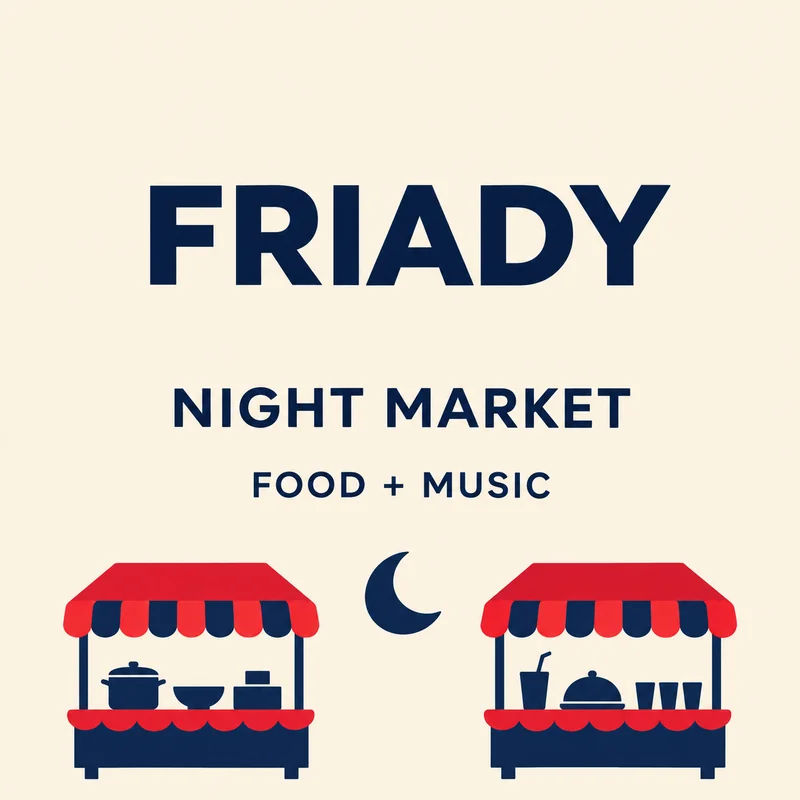
The original night-market poster reads FRIADY. This real result changes it to FRIDAY, leaving NIGHT MARKET, FOOD + MUSIC and the stalls outside the box unchanged.

Spotted a spelling mistake after exporting? Enter the word as it appears, then type the spelling you want.
Up to 60 characters. One block of printed Latin text.
FRIADYFRIDAY
The original night-market poster reads FRIADY. This real result changes it to FRIDAY, leaving NIGHT MARKET, FOOD + MUSIC and the stalls outside the box unchanged.
Start with an opaque graphic whose misspelled word is still readable Latin text on a plain or smooth-gradient background. Copy the typo exactly into the current-text field, including its case and punctuation. In the new-text field, type the spelling you have checked yourself. Select the whole word with enough space for any added letters; do not box just the misplaced letter.
One clear text region on a flat or smooth-gradient background. Opaque PNG, JPEG or WebP; up to 10 MiB and 16 megapixels. Latin text and numbers only. The interface is available in English and Simplified Chinese; Chinese image text editing is not supported.
The free check comes first. In rejectable mode, 1 credit is charged only if you keep the result. With no free rejections left, delivery charging requires your confirmation before generation. Technical failures return the held credit.
Correct a transposed letter in an event heading or a misspelled word on your promotional artwork. This works when you know the replacement and only have the flattened image. The downloaded file keeps its original dimensions, so check the corrected word at the size your audience will see.
Download an opaque PNG at the original image dimensions. Pixels outside your selected box are preserved. Inspect every changed letter and number before publishing; matching a font inside the box is not guaranteed.
Patchtype does not proofread the image or choose the correct spelling for you. Repeated mistakes in different locations need separate edits. It cannot reliably identify a word whose letters are tiny, blurred or joined into unreadable shapes. Chinese, Japanese and Korean text, handwriting and corrections to official documents are unsupported.
Enter the typo exactly as it appears in the image. Put the correct spelling in the new-text field. For this example, the two inputs are FRIADY and FRIDAY.
Select the whole word so there is room to keep its spacing coherent. Include enough clear background for a longer correction without selecting another line.
No. You identify the mistake and supply the correction. Check the rest of the graphic yourself; words outside the selected box stay unchanged.
No. It checks whether the selected edit is supported. Verify the spelling before generating and inspect the actual result before publishing.